
Dressmaker sewing controls and seam accuracy
Read Dressmaker sewing prompts and see how joined edges affect commission quality.
Last updated: 2026-09-27
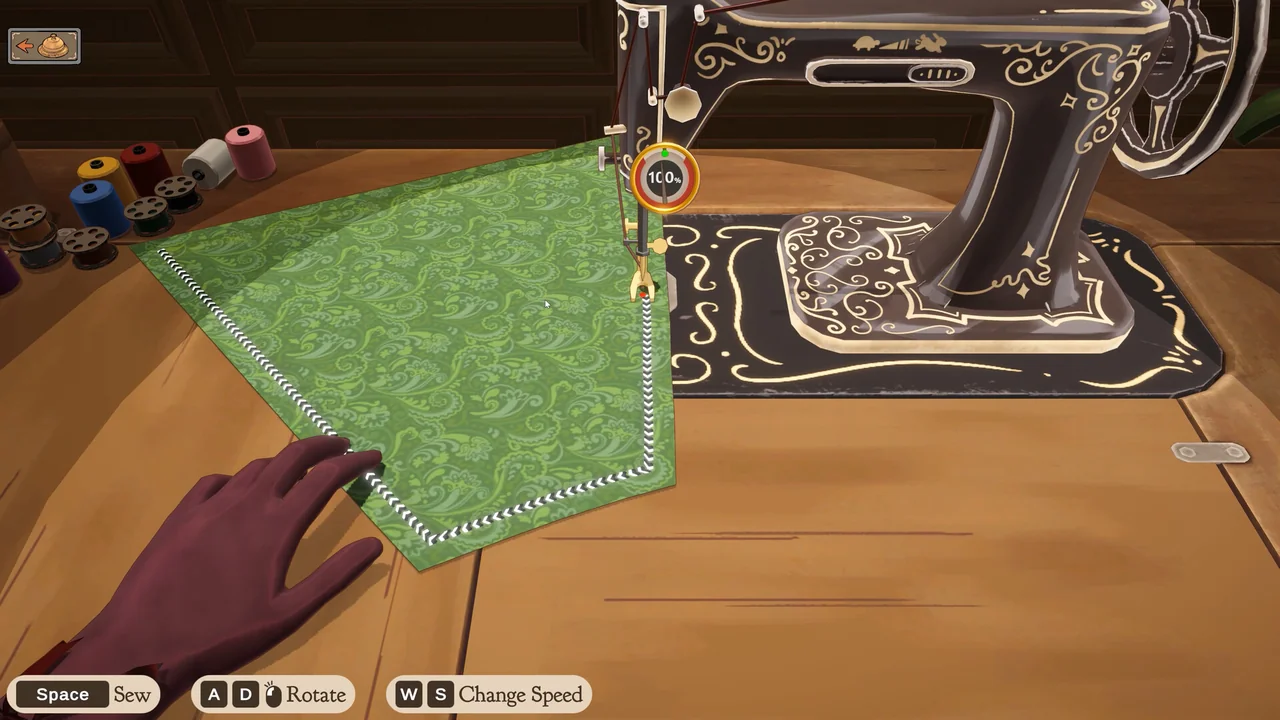
Read the prompts
The official Steam sewing screenshot shows Space for sewing, A/D for rotation and W/S for changing speed. Check the prompts in your own build if the layout differs.
The in-game tutorial also describes moving the mouse left and right to rotate the piece and pressing Space to sew. Follow the prompts shown by your installed version.
Controls that change the next stitch
- Hold Space or the right mouse button to feed fabric continuously at the current speed. W/S, Up/Down, or dragging the speed control changes that setting.
- Drag with the left mouse button to rotate around the needle. A/D or Left/Right also controls rotation; rotation alone does not continuously feed fabric.
- Move the mouse wheel in either direction for a short feed pulse. It does not change the speed setting.
- Press R to redo the current seam segment, clearing that segment's stitch samples and mistakes. This is useful when a segment has gone badly, rather than starting an entirely new dress.
Practise control first
Start with a pace you can follow. Watch the edge near the needle and become comfortable with rotation before trying to work faster. Treat this as practice advice, not a promise of a perfect score.
Learn from the feedback
The showcase includes a percentage indicator beside the needle. Use the feedback visible during your attempt to compare your movements. For the finished dress, the game combines seam accuracy after weighting each join by its number of connected edges. See how sewing contributes to a customer's commission quality.
The controls above were checked in the current game input and sewing logic, without a live client playthrough. Style scores are a separate garment measure from seam accuracy.
Keep the catalog close
Fabrics · Dress pieces · Accessories & trims · Commission requirements